Picture one 20-minute founder interview. Solid stuff. Now it needs to become a YouTube cut, five Reels, a LinkedIn clip, a newsletter embed, and captions. Most teams ship one and drop the rest.
The camera is rarely the problem. The week disappears after the shoot: editing, resizing, captioning, versioning, posting.
That gap is where AI video content automation tools earn their keep. Video is already standard. Wyzowl’s 2026 State of Video Marketing survey found 91% of businesses use it as a marketing tool.
This guide matches tools to each stage of your pipeline. You end up with a stack, not a pile of subscriptions.
One honest note up front. Automation handles the repeatable work. You still own the story, the brand voice, and the final approval.
What are AI Video Content Automation Tools, and What Don’t They Do?
They are software that handles repeat tasks on footage you already shot. Think transcribing, trimming, captioning, resizing, and scheduling. They are not magic cameras.
People lump video content automation software in with AI video generators. Those are different jobs. Mixing them up wastes real money.
Is Automation the Same as AI Video Generation?
No. Generation creates footage, avatars, or voiceovers from a prompt. Automation moves, trims, captions, and publishes footage you already have.
| Automation tools | Generation tools | |
|---|---|---|
| Input | Your real footage | A prompt or script |
| Output | Clips, captions, resized versions | New synthetic video or voice |
| Best for | Brand stories, webinars, interviews | Training, explainers, internal comms |
| Main risk | Weak source footage | Looks generic or off-brand |
Most brand teams get more value from automation. It protects your authentic footage and cuts the repetitive hours.
What Can’t These Tools Do Yet?
They can’t judge your brand voice. They also can’t tell which 30 seconds of a 40-minute interview is the real hook.
They can’t rescue bad audio or bad lighting either. Fix those at the source.
Expert Tip: Build a “hook map” before you run any tool. Mark the three moments in your video you would clip by hand. Then see if the AI found the same ones. That tells you how much to trust it.
How Does an Automated Video Content Pipeline Actually Work?
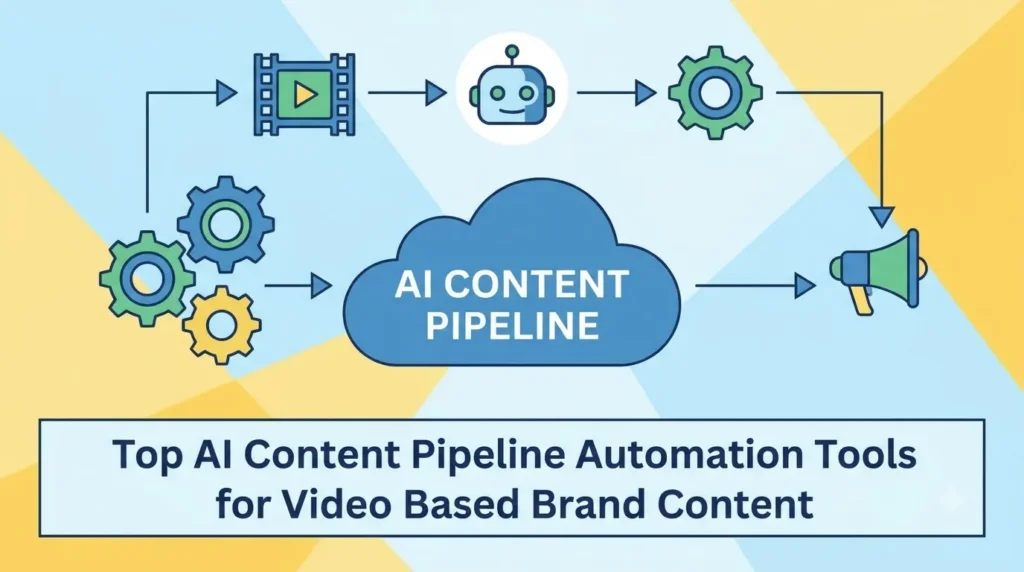
It runs in five stages: plan, capture, edit, repurpose, distribute. Each stage hands a file to the next. A good AI content pipeline automation tool removes a handoff.
What Are the Five Stages?
- Plan. Topic research, briefs, and scripts. Output: a script or interview outline.
- Capture. Filming or recording source footage. Output: raw files.
- Edit. Rough cuts, captions, audio cleanup, brand templates. Output: a master video.
- Repurpose. Long form to short form, new aspect ratios, thumbnails. Output: a clip set.
- Distribute. Scheduling, versioning, analytics handoff. Output: published posts.
Put a human checkpoint between edit and distribute. Nothing goes live unreviewed.
Where Do Most Pipelines Break?
At the handoffs. Files get renamed, exported at the wrong spec, or sit waiting on approval.
Take Dana, who runs a three-person HVAC company in Tampa. Her installer films a great customer testimonial on a phone. The file sits in a text thread for nine days.
The video was fine. The handoff failed. (Dana is a composite of situations that show up on small-business shoots all the time.)
The tools below each fix a specific breakpoint.
Which AI Video Content Automation Tools Fit Each Stage?
Pick by stage, not by popularity. A tool that shines at clipping may be mediocre at editing. Features change fast, so confirm details on each vendor’s site before you buy.
Want the wider landscape? Our guide to AI Tools for Video Marketing covers it.
Planning and Scripting
General AI assistants draft briefs and scripts. Keyword and topic tools show what your buyers search for.
Feed them your brand voice document, not a generic prompt. The limit: drafts sound like everyone else’s unless you edit hard.
Editing Automation
Text-based editors let you cut video by editing the transcript. Descript is the best-known example. Its Studio Sound feature cleans up echo and background noise, and it also removes filler words.
Adobe Premiere’s AI features and CapCut compete here too. The limit: auto-cuts still need a human pass.
For more ideas, see AI Tools to Speed Up Video Production.
Repurposing Long-Form into Short-Form
Clip finders scan a long video and suggest highlights. OpusClip describes itself as a repurposing tool with auto reframing and brand templates. Vizard works in a similar lane.
This is automated video repurposing at its simplest. The limit: clip pickers favor punchy moments, not always on-brand ones.
AI Video Generation and Avatars
Synthesia and HeyGen turn a typed script into a presenter video. That makes them the easiest AI video maker for beginners with no experience.
They fit training, explainers, and internal updates. They fall short on customer-facing brand storytelling.
Brand Templates, Localization, and Dubbing
Template tools lock fonts, logos, and lower-thirds across every editor on your team. AI dubbing and subtitle translation help with multi-market campaigns.
Have a native speaker review translated captions. Machines still miss tone.
The Glue: Workflow Automation and Asset Management
Zapier and Make connect your tools. A trigger moves work forward on its own.
Example: new file lands in a folder, it gets transcribed, goes to your editor, and pings Slack.
Tool Stack at a Glance
| Stage | Example tools | Best for | Skill level | Watch out for |
|---|---|---|---|---|
| Planning | AI assistants, keyword tools | Briefs, scripts | Beginner | Generic voice |
| Editing | Descript, Premiere, CapCut | Interviews, webinars | Beginner to intermediate | Auto-cuts need review |
| Repurposing | OpusClip, Vizard | Long form to shorts | Beginner | Off-brand clip picks |
| Generation | Synthesia, HeyGen | Training, explainers | Beginner | Feels impersonal |
| Templates and dubbing | Template editors, dubbing tools | Consistency, multi-market | Intermediate | Translation slips |
| Workflow | Zapier, Make | Handoffs | Intermediate | Broken triggers |
How Do You Choose the Right Tools for Your Team?
Start with your bottleneck, not a feature list. Buy for the slowest step in your process.
What Should You Ask Before You Subscribe?
- Where is the real bottleneck? Don’t buy a generator if editing is the problem.
- How many videos, in how many formats? Volume decides the tier you need.
- Who touches the footage? One person or a team with approvals?
- Does it export what your channels need? Check specs and storage integrations.
Short video is worth planning for. In Wyzowl’s data, 63% of consumers said they would most like to watch a short video to learn about a product, more than any other format.
What If You’re a Total Beginner?
Start small. Use one tool per stage, tops.
Pick tools with templates and a free trial. Pair a captioning or clipping tool with a simple editor. Add nothing else until that pair works.
How Do You Build Your First Automated Video Pipeline, Step by Step?
Use one anchor video, such as a webinar, founder interview, or product demo. Run it through five steps.
Meet Marcus, who owns a landscaping company in Columbus. He records one “ask the pro” video a month. (Another composite, built to show the flow.)
Step 1: Pick One Anchor Format and Map the Outputs
Decide the outputs first. Marcus wants one long cut, four shorts, one audio clip, and captions.
Step 2: Standardize Your Inputs
Use the same recording settings every time. Name files the same way. Drop everything into one shared intake folder.
Automation fails on messy inputs.
Step 3: Connect the Tools and Add Triggers
New file hits the folder. It auto-transcribes. Clip suggestions appear. The editor’s queue fills.
No code needed. Most connectors use plain dropdown menus.
Step 4: Insert Human Approval Gates
Add one checkpoint after clip selection. Add one more before publishing. Name an owner for each.
Marcus approves every clip himself. It takes him 15 minutes.
Step 5: Review the Numbers and Tighten
Track hours saved per video. Track which clips people actually watch.
Cut any tool that doesn’t move one of those numbers.
Expert Tip: Time your first manual run with a stopwatch. That number is your baseline. Without it, you can’t prove the pipeline saved anything.
What Mistakes, Myths, and Pro Tips Matter Most?
Three traps cause most of the waste. Avoid them and your tool budget goes further. For a deeper list, read our breakdown of AI Video Production Mistakes.
What Are the Most Common Mistakes?
- Buying five tools before documenting the workflow. Map first, shop second.
- Skipping a brand style guide. Every automated cut then looks different.
- Publishing auto-captions unchecked. Names, product terms, and jargon get mangled.
- Repurposing weak source content. Automation multiplies quality and flaws equally.
Which Myths Should You Ignore?
| Myth | Fact |
|---|---|
| AI will edit the whole video for me. | It drafts. You direct. |
| More tools means more efficiency. | Every added tool adds a handoff. |
| Automated clips hurt brand quality. | They only do without templates and review. |
| Automation replaces a production crew. | It extends what one good shoot can do. |
What Pro Tips Save the Most Time?
- Record with repurposing in mind. Speak in standalone sentences. Leave small pauses. Film a few vertical-safe framings.
- Keep a living list of brand terms. Use it to fix captions fast.
- Batch approvals weekly. Reviewing one clip at a time burns hours.
- Be open about how you made it. Google’s guidance on AI-generated content says the goal is helpful, people-first content, however it is produced. Publish transcripts with a clear author and a short note on how AI helped.
Teams are already moving this way. A 2026 roundup of video marketing statistics reports that Wyzowl found 63% of marketers now use AI video. Being early no longer sets you apart. Being good does.
Where Does Human Production Still Win?
In brand films, customer stories, and flagship campaigns. A real crew, a directed interview, and deliberate lighting and sound still beat anything a tool can generate.
Think of automation as the system that stretches one great shoot across many channels. Many businesses pair a professional shoot with an automated post-production pipeline. The shoot sets the quality. The pipeline sets the reach.
Cost is part of that math. See how AI is Lowering Video Production Costs without replacing the shoot itself.
Ready to Automate Your Video Content?
Start small. Three takeaways cover it:
- Map your pipeline before you buy anything.
- Choose tools by stage, not by hype.
- Keep humans at the approval gates.
Grab one long video you already have. Run it through a basic pipeline this week. That first run will teach you more than any tool comparison.
Your future self, drowning in raw footage, will thank you.
FAQs
What are AI video content automation tools?
They are software that handles repeatable video tasks like transcription, captioning, clipping, resizing, and scheduling. Teams use them to produce more content from the same footage. They work on video you already shot.
What is the easiest AI video maker for beginners with no experience?
Template-based editors with auto-captions and drag-and-drop screens are the easiest. Avatar tools work too, since you just type a script. Start with one tool and a free trial.
How do I automate video content creation for my brand?
Define your outputs first. Standardize file names and settings. Connect tools with triggers, then add human approval gates before publishing. Start with one anchor video and expand from there.
Can AI tools repurpose long videos into short clips automatically?
Yes, with limits. Clip finders surface strong candidates and add captions and reframing. A person should still confirm each clip matches your brand voice before it goes live.
Do I need a big budget to build an automated video content pipeline?
No. Small teams can start with one or two tools and add more as volume grows. Plans and prices change often, so check current pricing on each vendor’s site.
Will automation replace my video production team?
No. It removes repetitive post-production work. Strategy, storytelling, and quality control stay human. Your team gets time back for the work that actually builds your brand.