Video is everywhere in 2026. Reels, YouTube, TikToks, product demos, brand stories, the demand for video content has exploded, and it is not slowing down.
But here is the problem. Creating great video content takes a ton of time. Shooting, editing, captioning, exporting, it is a lot. And most creators and business owners do not have a full production crew sitting around.
That is where AI video production comes in. AI is quietly (and sometimes loudly) changing how videos get made. From smart cameras that frame shots automatically to software that edits your footage while you grab coffee, AI is doing the heavy lifting.
In this post, we are going to break down exactly how AI is transforming video production from start to finish. And trust me, it is pretty wild stuff.
What is AI Video Production?
Simply put, it is when artificial intelligence helps you create, edit, or optimize videos, faster and with less manual effort.
AI video production covers everything. Writing scripts, shooting footage with smart cameras, auto-editing raw clips, generating captions, even creating thumbnails. It handles a huge chunk of the boring stuff so you can focus on the creative parts.
Traditional video production used to mean hiring a full team, spending hours in editing software, and hoping everything came together. AI-assisted production cuts that timeline dramatically.
According to a report by PwC, the AI-in-media market is expected to exceed $99 billion globally by 2030. That says a lot about where things are headed.
How AI Is Making Video Production Faster and Easier in 2026
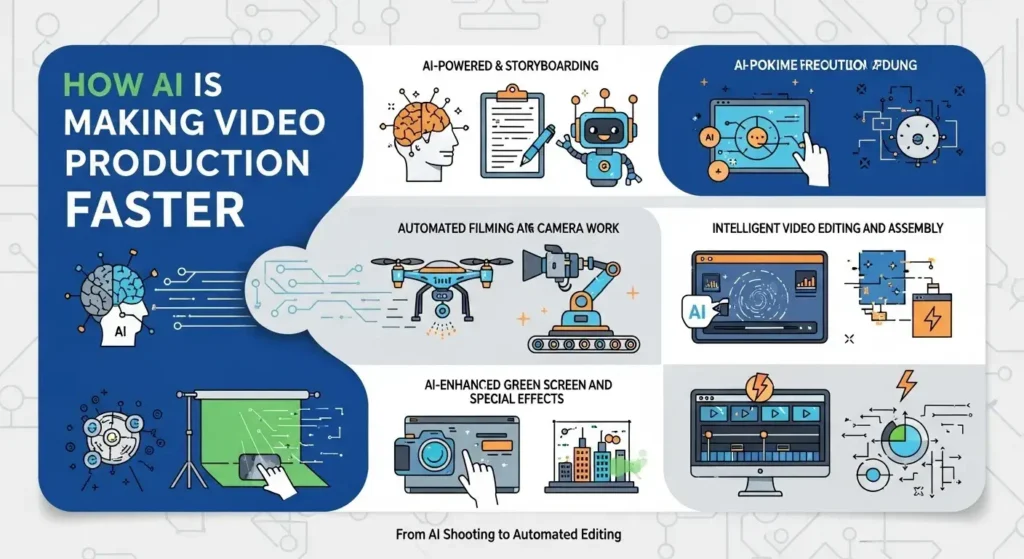
1. Faster Video Shooting Assistance
Modern AI-powered cameras and smartphone apps now use smart framing and autofocus to keep your subject sharp and centered automatically. No more asking your friend to hold the camera while you awkwardly wave your arms trying to stay in frame.
Scene detection is another big one. AI can recognize what kind of shot you are going for — wide angle, close-up, action — and adjust settings in real time. Tools like DJI’s intelligent flight modes or the iPhone’s Cinematic Mode are great everyday examples of this technology in action.
2. Automated Editing Workflows
This is where things get really exciting. AI editing tools can take raw footage and automatically cut it into a finished video. They identify the best clips, remove awkward silences, add transitions, and even sync cuts to music.
Platforms like Descript and CapCut’s AI editor can generate a rough cut in minutes. What used to take a full day of editing can now take under an hour for a lot of creators.
Auto-generated subtitles are another huge win. Apps like Adobe Premiere Pro’s auto-caption feature or Zubtitle can add accurate captions in seconds, which is a massive deal for social media content.
3. AI-Powered Content Organization
Got 200 raw clips sitting on your hard drive with names like “clip_0047_final_FINAL2”? AI can help with that too.
Tools now use automatic tagging and media management to sort footage by subject, scene, or emotion. Frame.io and similar platforms let you search your footage the same way you search Google. Type “person smiling outdoors” and boom, there it is.
4 Quicker Publishing and Optimization
AI does not stop at editing. It also helps you publish smarter. From auto-generating video descriptions and metadata to suggesting the best thumbnail using visual performance data, AI tools make the publishing process way faster.
YouTube’s built-in AI tools can suggest tags and titles. Third-party tools like TubeBuddy or VidIQ go even further by analyzing what keywords help videos rank better.
Benefits of AI in Video Production
Here is the short version:
- It saves enormous amounts of time during editing and post-production.
- It improves workflow efficiency so your team can handle more projects.
- It helps small teams or solo creators produce at a much higher volume.
- It reduces repetitive manual tasks like transcription, color correction, and caption writing.
- It makes professional-quality video more accessible even if you have zero editing experience.
Think about a small business owner in Chicago who wants to post weekly videos but has no dedicated video team. AI tools put professional production within reach without blowing the budget. (And if you ever need a full crew, a Video Production Company Chicago can take things to the next level.)
AI in Video Shooting and Editing
On the shooting side, AI-powered stabilization removes shaky camera movement automatically. Subject tracking keeps moving people or objects in focus without manual adjustment. Scene recognition adjusts exposure and white balance on the fly.
During post-production, AI handles color correction by analyzing the footage and applying consistent color grades. Audio cleanup tools like Adobe Podcast remove background noise with a single click.
The result? Footage that looks polished coming straight out of the camera, with far less work needed in post.
Brands that used to spend two to three days on post-production for a single video are now finishing similar projects in a few hours. That is not an exaggeration.
Best AI Tools for Video Shooting and Automated Editing
Here are some solid options worth exploring:
- Descript: Great for editing video by editing text. Delete a word in the transcript, it disappears from the video. Wild but incredibly useful.
- CapCut (Pro): A beginner-friendly AI editing tool that is huge with social media creators.
- Adobe Premiere Pro: Now packed with Sensei AI features for auto-reframe, auto-captions, and audio enhancement.
- Runway ML: Advanced AI video generation and editing, popular with creative agencies.
- Gling: Specifically built for YouTube creators, it auto-removes bad takes and silences.
- Opus Clip: Turns long videos into short clips for social media automatically.
- Wisecut: Auto-edits based on audio cues, great for talking head videos.
When picking a tool, look for features like batch processing, caption accuracy, export flexibility, and how well it integrates with your existing workflow.
AI Tools for Automated Video Editing
A lot more than most people expect.
Modern AI editing tools handle automatic scene cuts and transitions based on the pacing of the content. They generate subtitles and captions with impressive accuracy, often over 95% without any manual correction.
Audio enhancement features remove background hum, echo, or wind noise with one click. This alone saves hours of tedious audio work.
For social media marketers, AI editing tools shine when it comes to reformatting videos. A single long video can be automatically resized and recropped for YouTube, Instagram, TikTok, and LinkedIn all at once.
AI Powered Video Creation Explained
Yes, that is a real thing now. Text-to-video AI tools like Sora by OpenAI or Runway Gen-3 can generate short video clips from a written prompt. You type a description and the AI builds a scene.
AI can also write scripts, generate voiceovers using synthetic voices, and even produce personalized marketing videos at scale. Imagine sending 10,000 personalized video messages where the AI says each customer’s name. That is already happening.
That said, creativity still matters. AI-generated video can feel flat or off without a human guiding the story, tone, and emotion. The best results come from combining AI efficiency with genuine human storytelling.
Smart Video Production Workflow Using AI
Here is a simple AI-assisted workflow that works for creators and agencies:
- Use AI to generate or refine your script.
- Shoot with AI-assisted camera tools for better framing and focus.
- Import footage into an AI editing platform for an automatic rough cut.
- Review the AI cut, add your human touches, adjust pacing.
- Use AI for captions, thumbnails, and metadata.
- Schedule and publish using an AI-powered content calendar tool.
This kind of workflow cuts production time by 50 to 70 percent for many teams. And it makes collaboration easier because AI handles version management and revision tracking.
Machine Learning in Video Editing
Machine learning is the engine behind most of these AI editing features. It works by analyzing thousands (sometimes millions) of videos to learn what good editing looks like.
Over time, ML models get better at predicting the best cuts, identifying highlight moments, and suggesting pacing based on audience behavior data. Platforms like YouTube and Netflix use ML to analyze viewer drop-off and engagement to inform editing recommendations.
The more these tools are used, the smarter they get. That is the real power of machine learning in video editing — it improves with every project.
How Automated Video Editing Saves Time for Creators and Businesses
A lot. Here is a quick reality check:
- Manual editing of a 10-minute video typically takes 2 to 5 hours.
- AI-assisted editing of the same video can take 20 to 45 minutes.
- Adding captions manually to a 5-minute video takes about 30 minutes. AI does it in under 2 minutes.
For businesses producing content at scale, those savings add up to hundreds of hours per month.
It also means smaller teams can produce more. A two-person marketing team using AI tools can realistically output what a five-person team used to produce. That is a serious competitive edge.
Challenges and Limitations of AI Video Production
There are some real limitations to be aware of.
AI-generated content can look generic if you rely on it too heavily. When everyone is using the same tools with default settings, videos start to look alike.
Over-automating can also strip out personality and storytelling. Audiences connect with humans, not perfectly-edited robots.
There are also ethical concerns around AI-generated avatars, synthetic voices, and deepfakes. Transparency matters here. Always disclose when content is AI-generated.
And quality control still requires a human eye. AI makes mistakes — wrong cuts, weird caption errors, tone-deaf thumbnail suggestions. Review everything before publishing.
Future Trends in AI Video Production
Things are moving fast. Here is what is coming:
- Real-time AI editing during live streams
- AI-generated avatars that can represent a brand 24/7
- Personalized video content that adapts to each viewer automatically
- Deep integration with AR and VR experiences
- Smarter AI filmmaking tools that can direct and storyboard full productions
The line between human-made and AI-made video is going to keep blurring. The creators who figure out how to use AI as a collaborator — not a replacement — will be the ones who come out ahead.
Conclusion
AI is not replacing video production. It is turbochargeing it.
From smart cameras that frame shots automatically to editing software that builds a rough cut while you sleep, AI is saving creators and businesses enormous amounts of time. The benefits are real — faster production, lower costs, and the ability to create more content consistently.
But here is the thing. AI works best when there is a human behind it with a clear vision and a genuine story to tell. Use AI for the repetitive stuff. Save your energy for the creative decisions that actually make a video memorable.
If you have not started exploring AI-powered video tools yet, 2026 is a great time to start. Pick one tool, test it on your next project, and see what happens. You might be surprised how much time you get back.
FAQs
1. How is AI making video production faster?
AI automates tasks like editing, captioning, scene detection, and content organization, helping creators produce videos far more efficiently than manual methods.
2. What are the best AI video editing tools in 2026?
Popular options include Descript, CapCut Pro, Adobe Premiere Pro, Runway ML, Gling, Opus Clip, and Wisecut — each with different strengths for different workflows.
3. How does automated video editing save time?
It handles cuts, transitions, captions, and audio cleanup automatically, reducing what used to take hours down to minutes.
4. Can AI help with video shooting as well as editing?
Yes. AI assists with smart framing, autofocus, stabilization, scene recognition, and post-production color and audio correction.
5. What are the benefits of AI in video production?
AI improves efficiency, speeds up production timelines, reduces repetitive manual tasks, and helps businesses produce more content consistently with smaller teams.